Video calls need permission at two levels: your operating system has to allow the browser to use the camera and microphone, and the browser has to allow this site to use them. Both have to be on for video to work.
If you only do one thing:
Open your video session, click Join Video Call, and accept the browser's “Allow camera and microphone?” prompt. If you don't see a prompt, the steps below are probably what you need.
Not sure what's wrong?
Test your setup checks your camera, microphone, speakers and connection on this device and tells you which of the steps below you need.
macOS
1. System permission
Apple menu → System Settings → Privacy & Security
Click Camera → switch your browser to On
Click Microphone → switch your browser to On
Quit the browser completely and re-open it. The change usually doesn't take effect until the browser is restarted.
2. Browser permission
When you click Join Video Call, the browser shows a prompt asking to use your camera and microphone — click Allow. If you accidentally blocked it earlier:
Chrome / Edge: click the camera icon in the address bar → Always allow.
Safari: Safari menu → Settings → Websites tab → Camera (and Microphone) → set teachersdelivered.co.uk to Allow. Then close and reopen the tab.
Firefox: click the camera icon in the address bar → remove any block → reload.
Windows
1. System permission
Settings → Privacy & security
Camera → turn on “Camera access” and “Let apps access your camera” → make sure your browser is in the allowed list
Microphone → same steps
2. Browser permission
Chrome / Edge: click the camera icon in the address bar → Always allow → Done.
Firefox: click the camera icon in the address bar → remove any block → reload.
iPhone / iPad
Settings → Safari → Camera → set to Allow (or Ask)
Settings → Safari → Microphone → set to Allow
If using Chrome on iOS, the same Settings page → Chrome → enable Camera and Microphone
In Chrome on the site, tap the lock icon → Permissions → make sure Camera and Microphone are allowed
Screen sharing won't start
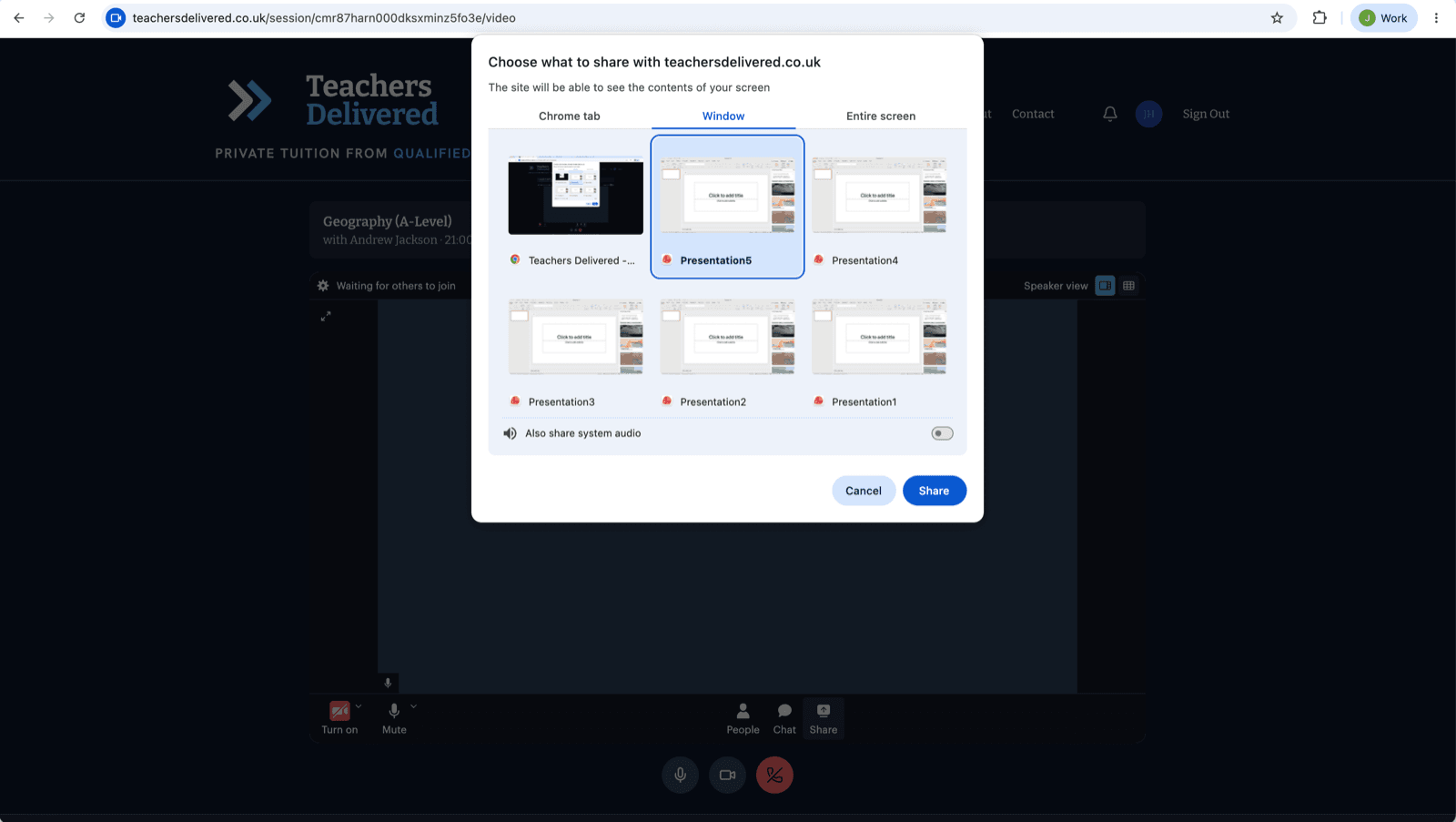
When you press Share screen in Chrome or Edge, the browser opens a “Choose what to share” window. Nothing is shared until you pick something in it:
Choose a tab at the top: a browser tab, Window (best for PowerPoint) or Entire screen.
Click the preview of what you want to share, so it's outlined. The Share button stays greyed out until you do.
Press Share.
If it still won't share
Your presentation isn't in the list: open it first, then press Share screen again, or choose Entire screen.
Mac: Apple menu → System Settings → Privacy & Security → Screen & System Audio Recording (called Screen Recording on older versions) → switch your browser on, then quit and reopen the browser.
Work or school laptop: some IT departments switch screen sharing off. Try a personal computer, or share the file instead (below).
Phone or tablet: browsers on phones and tablets can't share the screen. Use a laptop or desktop computer.
The lesson needs to carry on now: upload the file under Files on the lesson page, and your pupil can open it from theirs.
Presenting slides while seeing your pupil (tutors)
Sharing a PowerPoint and want to move through the slides while still seeing your pupil? Use the call's pop-out button: it floats your pupil's video in a small window that stays on top of everything — including a full-screen slideshow.
In the call, click Share screen. When the browser asks “Choose what to share”, choose Entire screen and click Share. With two screens, pick the one your slides are on, not the one with the call. Your pupil sees everything on that screen, so close your email and messages first.
In Chrome and Edge your pupil's video pops out by itself as you start sharing; in Safari, click the pop-out button (the picture-in-picture icon). Either way it floats on top: drag it to a corner and resize it however you like.
Straight away, switch to PowerPoint and start your slideshow full screen (F5) — the floating video stays visible over it. Until then you'll both see the call repeated inside itself, like two mirrors; it stops once the slides are on top.
Use the arrow keys or Page Down in PowerPoint to move through the slides. You always control the real PowerPoint; the copy inside the call is just a live picture.
To share just the presentation instead, pick the Window tab, select your presentation, then click Share. If your presentation isn't in the list, even though it's open, use Entire screen.
No pop-out button? (older browsers, or the classic layout)
Run the slides in a window rather than full screen — full screen would hide the call:
In PowerPoint: Slide Show → Set Up Slide Show → choose “Browsed by an individual (window)”. The slideshow now runs in a normal window instead of taking over the screen.
Put the windows side by side: Win + ← to snap PowerPoint to one half, Win + → to snap the call to the other.
Share your entire screen (or the presentation window) as above, then use the arrow keys to move through the slides — and glance at your pupil in the call beside it.
Two screens? Even easier — run the slideshow full screen on one monitor, keep the call on the other, and share that monitor.
If the setup check shows a red line
These are the exact messages the setup check shows, so you can find yours here and follow the steps in full.
Android (Chrome, Edge, Brave, Samsung Internet): “Blocked by your browser”
Access is blocked. Tap the or icon to the left of the web address > Permissions, switch camera to Allow, then reload this page. If you don't see Permissions, choose Reset permissions and reload.
iPhone / iPad (Safari): “Blocked by your browser”
Access is blocked. Open Settings > Safari > Camera and choose Allow, then reload this page. If you're in another browser, allow it under Settings > that app.
Windows (Chrome or Edge): “Blocked by your browser”
Access is blocked. Click the or icon in the address bar, allow the camera, then reload this page.
Mac (Safari): “Blocked by your browser”
Access is blocked. In Safari's menu choose Settings for This Website, set Camera to Allow, then reload.
Mac (Chrome): “Blocked by your browser”
Access is blocked. Click the or icon in the address bar, allow the camera, then reload this page.
“In use by another app”
Another app is using your camera (Zoom, Teams, FaceTime or another tab). Close it and reload this page.
“No camera found” / “No microphone found”
No camera was found. Plug one in or use a phone or laptop with a built-in camera, then reload. No microphone was found. Plug in a headset or use a device with a built-in microphone, then reload.
“Video service” or “Connection” is red
Your network is blocking the video service. This is common on school or work Wi-Fi. Try mobile data or a different network, then run the check again.
Still not working?
Make sure no other app is using the camera (Zoom, Teams, FaceTime, etc.) — only one app can use it at a time.
Try an Incognito / Private window — rules out extensions blocking access.
On Safari, turn off “Prevent cross-site tracking” in Settings → Privacy temporarily and reload.
Restart your computer/phone — system permission changes sometimes require a reboot to fully apply.